BookStack Release v26.05
 Dan Brown posted on the 28th of May 2026
BookStack v26.05 releases today containing a varied bundle of little enhancements across the board. This also marks our first feature release which comes managed via Codeberg after our migration from GitHub!
Upgrade Notices
- Security Releases - There have been a number of security releases since v26.03. These can be found listed below, or on our updates page.
- Folder Permissions - Due to some changes in how fonts are used for exports, after updating you may need to ensure that the
storage/fontsfolder (and all folders within that) are accessible & writable by the web-server. If you start seeing errors on PDF export after updating, it’s likely this issue. See this page for guidance on setting permissions. - Revision Access - Revision access & visibility is now controlled separately to pages. In some cases, after upgrading, users may no longer be able to access revisions by default (for example, where users had access to view page content but had no role-level view permissions).
Contents View in Page Editor
Within the sidebar toolbox, when editing a page, you can now find a page contents view:
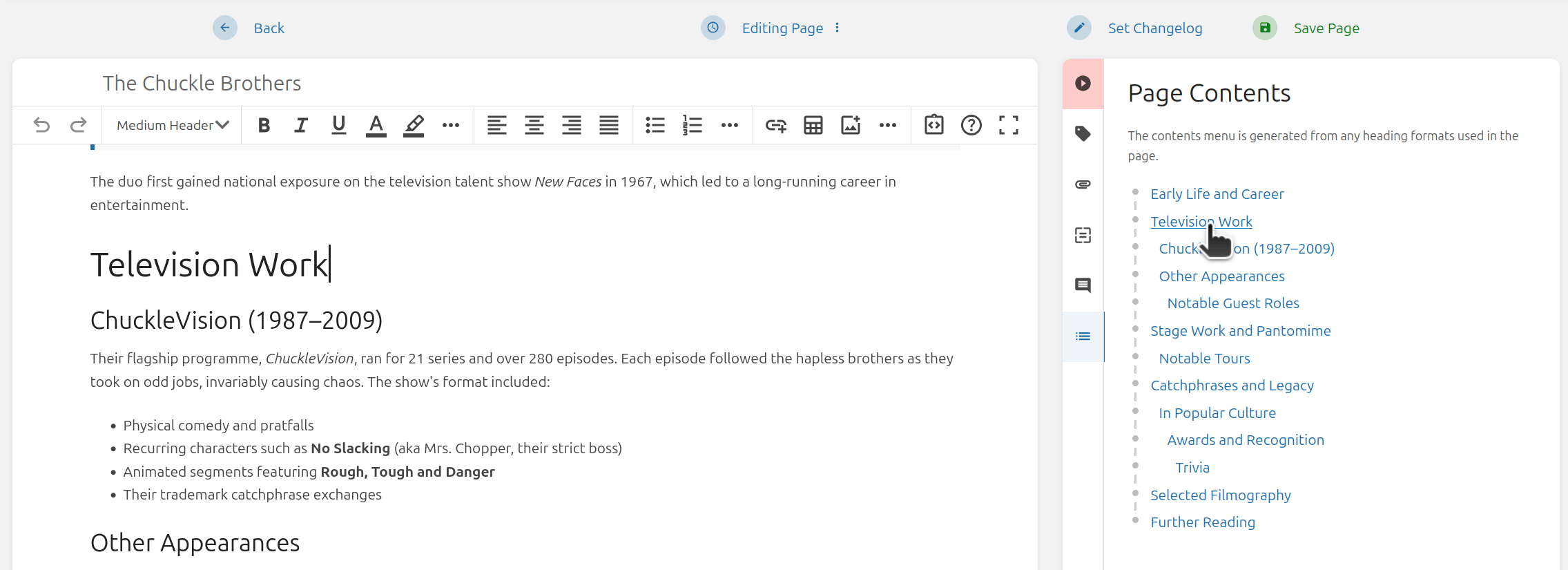
In the same manner when viewing a page, this lists out the heading hierarchy of the document so you can understand the overall structure. Clicking on a header will move and focus the text cursor on that header within the editor, providing a convenient way to jump to specific sections.
The click behavior is available across all editors: The default WYSIWYG editor, the new WYSIWYG editor, the Markdown editor in code mode, and the Markdown editor in plaintext mode.
New WYSIWYG Editor Improvements
Once again I’ve been working through user feedback to apply a whole bunch of fixes and improvements to the new WYSIWYG editor option:
- Added extra keyboard handling to toolbars so escape press will now focus back onto content.
- Added handling for internal content drag & drop so that content is preserved and less issues show up.
- Added keyCode-based fallback for shortcuts to allow them to be used for keyboard layouts such as Cyrillic, where the latin key representation may differ to the actual key value.
- Updated handling for inline format shortcuts to use our system so these changes work there too.
- Added missing button to toggle first table rows as header rows.
- Updated drop handling to provide more accurate placement, and result in fewer buggy scenarios.
- Updated HTML handling to use non-breaking spaces instead of span elements with CSS white-space rules. This provides a cleaner output, more consistent with the old editor, and also a cleaner conversion to Markdown.
- Updated lists so you can jump down, or out, or split the list via enter on empty item at any point in the list, not just the end.
- Updated lists to support block formats (so things like code blocks are possible on list items).
- Updated table cell up/down movement to retain rough cursor position.
- Updated table column/row resizers to have a little fade in/out animation to be less jarring.
- Updated toolbars to be smarter, so their stacking is dependent on specificity, and they’ll look to move above the target content if it will likely overlap an existing toolbar.
- Fixed actions/formats not applying on new/empty state.
- Fixed drawing images not updating after save.
- Fixed incorrect UI dropdown placement when using an RTL language.
- Fixed table headers going missing when using content from the old editor.
Thanks a bunch to all those who have been providing feedback! I’ve opened a fresh thread to gain further feedback as things are becoming more refined: New WYSIWYG Editor: Beta Testing Feedback v2 Thread
Separate Revision View Permission
Over the years, a question commonly heard, especially from those providing public access to their instance, was: How do I hide revisions? Outside of hacks or webserver rules, there wasn’t a great way.
In this release we’ve separated out permissions for accessing revisions into their own role level permission:
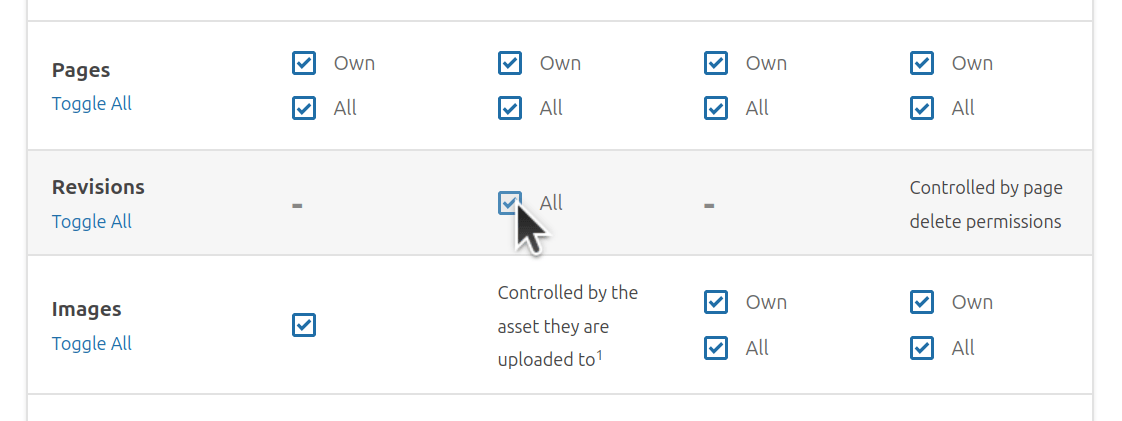
By default this will be granted to anyone that can view pages (to ensure no access changes on upgrade) but this permission can be removed from roles as needed to prevent access to revisions.
Note: this is only available at a role-permission level, so it’s somewhat global in scope. You can’t override it at a per book/chapter/page level at all.
Custom Font Handling for Default PDF Renderer
A common pain point when it comes to PDF exports has been language support. Those using languages which heavily use non-Latin characters can often find that the text of their PDF exports ends up as a bunch of boxes. This is due to lacking font support for those characters when the PDF is rendered.
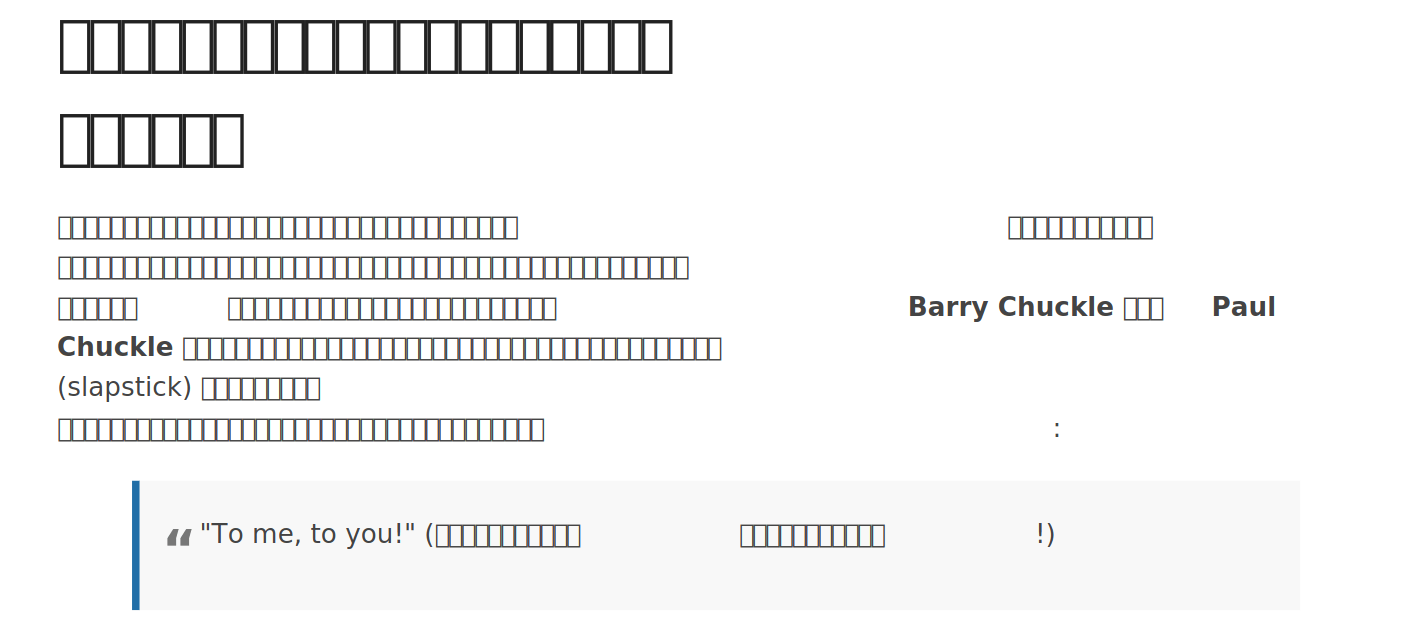
Unfortunately, shipping BookStack with support for all possible language fonts isn’t too practical and, even if it was, we’d be making assumptions about preferred fonts for different languages.
To help with this pain point, we’ve added a system to help with loading custom fonts for use with the default PDF render. This makes it possible to add fonts which can support languages which are not supported by default:
You can find full guidance for this within our documentation here.
Reset Multi-Factor Authentication In-App
When it comes to multi-factor authentication (MFA), there are scenarios where users may lose their files or phone, and thus lose access to their MFA methods preventing access to their BookStack user account.
A CLI command to reset user MFA exists, allowing an instance system administrator to reset methods for a particular user via the command line, but in some scenarios user administrators may not be the same people as system administrators, requiring additional communication and involvement from others to run this action.
To make this easier, there’s now an in-app action to reset the MFA options for a user:
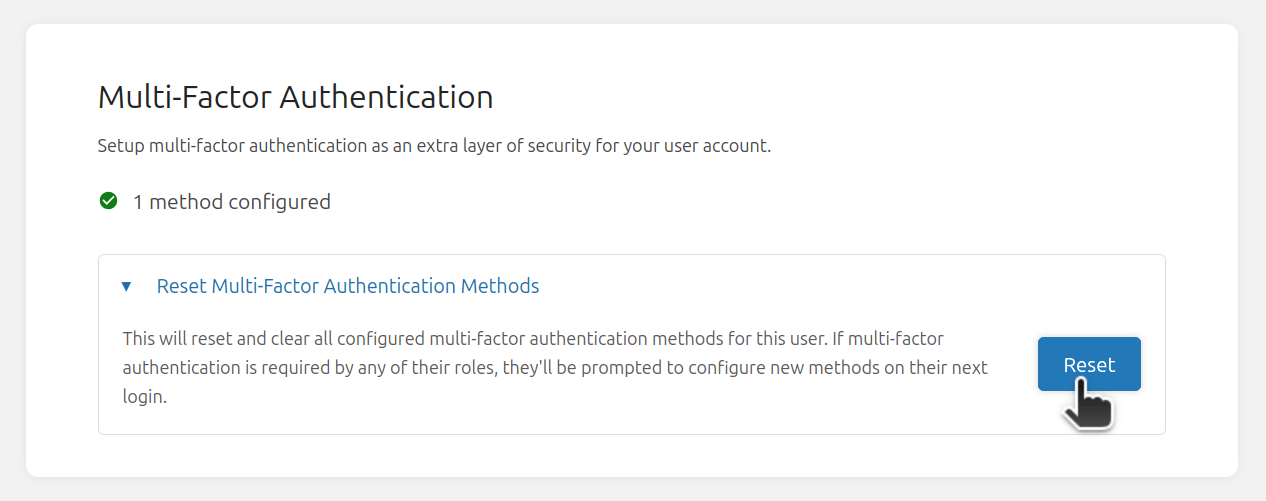
This will clear any MFA methods that user has set up. If that user’s role requires MFA, they’ll be promoted to set up new MFA methods on next login.
This action is only available to users which have permission to manage other users, and a new user_mfa_reset activity will be logged to the audit log when run to provide traceability.
Thanks to @clauvaldez for contributing this feature.
Inline Code Support in Description/Comment Editor
A little update to the simple editor used for descriptions & comments; It now fully supports the use of inline code:
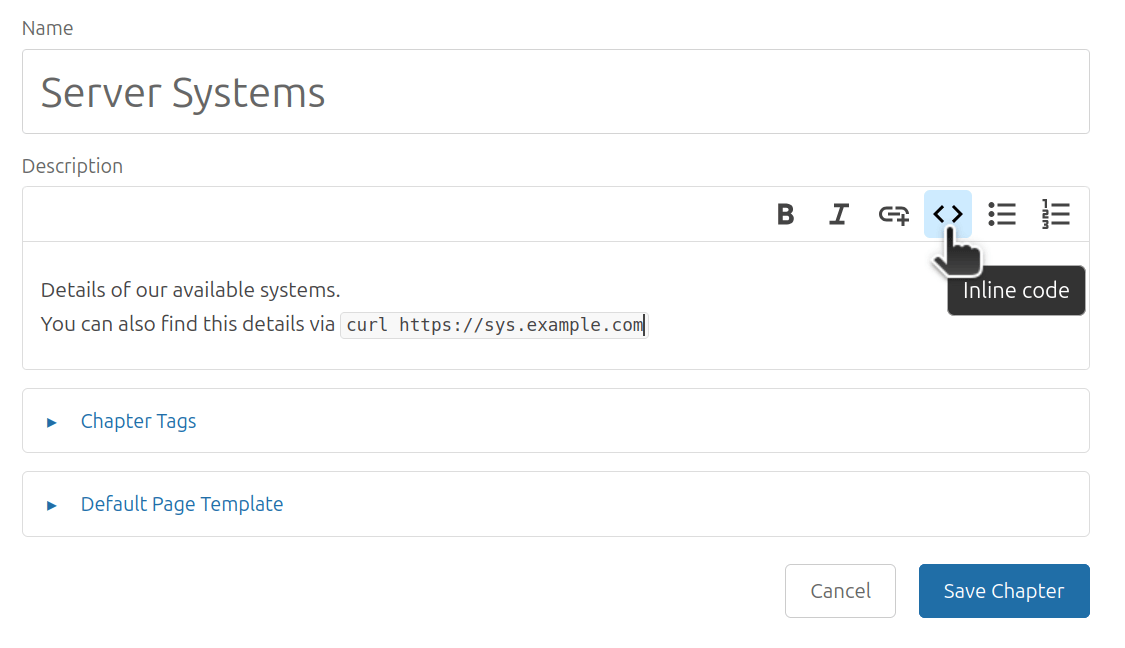
API Endpoints for Browsing Tags
The REST API in this release has gained endpoints for browsing tags.
These provide the information you’d see within the /tags view of the UI,
providing a breakdown of the tags applied across all content.
Here’s an example response:
Module Install Process Improvements
In the last feature release we added the theme module system. BookStack provides a command for the easy installation of modules. For this release we’ve made a couple of improvements to help general usability of this command:
- Theme module ZIPs will now support their files being in a single nested directory, instead of at root level, to support common ZIP structure approaches.
- Allowed cross-origin redirects on download, with a user prompt to confirm they trust the new origin.
These changes aid some common scenarios like, for example, providing a module directly via a GitHub repository.
Improved Plaintext Handling
BookStack handles editor content primarily as HTML, but in some cases this HTML is converted to plaintext for simpler display, like in preview snippets, or in plaintext exports.
For this release we’ve built in a smarter plain text converter which improves output quality while also providing a consistent result across various points of conversion. The primary benefit is better whitespace handling to help avoid various gaps in output text.
Image & CSS CSP Controls
We have applied “Content Security Policy” rules in BookStack for a while now to provide a layer of defense, helping block unexpected active content, but we have not applied such rules to image or style content since those elements can typically come from a range of sources.
In this release, we’ve now added some image and style CSP rules with added options to configure these. The default rules BookStack uses are relatively lax, allowing any outside source, which prevents breaking existing uses. For instances which want to bolster their security, they can set options here to limit where such content is fetched from, preventing use of unexpected external content.
Details of these options have been added to our security guidance here.
Thanks to @Zhey-on for contributing a PR for this one.
Improved Sort Rule UX
As a little UX improvement, we now indicate how sort rules can be configured when viewing a dropdown which lists sort rules:
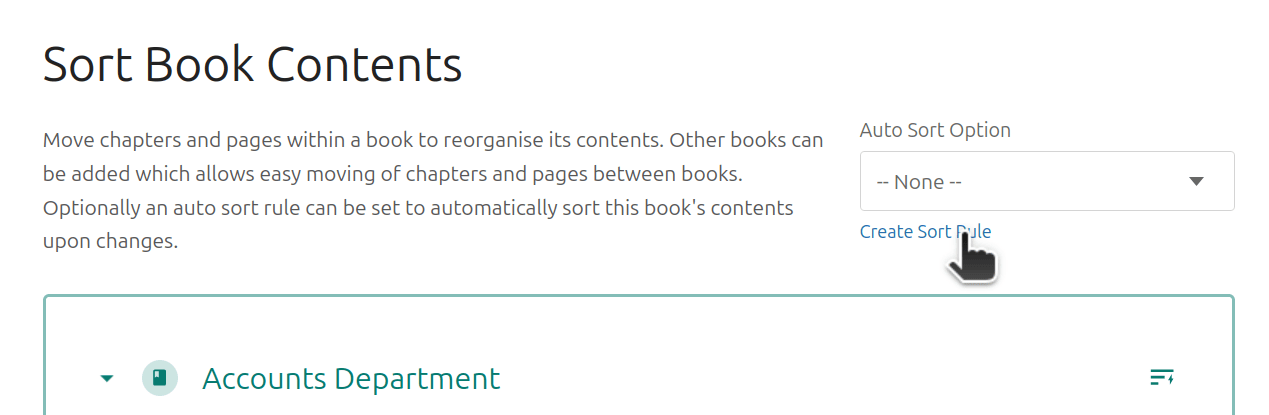
Sort rules were added in v25.02 to allow automatic sorting of content, and there are options to use them in the book sort view, and app settings view.
Translations
We have a new language option in this release: Thai! A special thanks to @tomztt on Crowdin for getting the language quickly up to completion.
Of course, thanks also to our thoughtful translation team who have provided a vast range of translation updates since our last feature release:
- MrClock (MrClock8163) - Hungarian - 4569 words
- Veyilla Nightwhisper (Veyilla) - German - 3037 words
- Suthep Yonphimai (tomztt) - Thai - 2463 words
- Elena0875 - Russian - 316 words
- Skiddybison5924 (chris-devel0per) - German Informal; German - 249 words
- João Barbosa (hypeedd) - Portuguese - 180 words
- Calle Calmar (HrCalmar) - Danish - 159 words
- poesty - Chinese Simplified - 104 words
- toras9000 - Japanese - 98 words
- scureza - Italian - 76 words
- serinf-lauza - French - 71 words
- FelixFrizzy - German - 49 words
- Honza Nagy (honza.nagy) - Czech - 33 words
- m0uch0 - Spanish - 33 words
- cbridi - Portuguese, Brazilian - 31 words
- Pedro de Mattia (pdmtt) - Portuguese, Brazilian - 21 words
- lonestan - Russian - 13 words
- Indrek Haav (IndrekHaav) - Estonian - 12 words
- Abcdefg Hijklmn (collatek) - Korean - 8 words
- Ruben Sutter (rubensutter) - German - 6 words
- jellium - French - 4 words
- Paul Kernstock (kernstock) - German - 1 words
Word counts are those tracked by Crowdin, indicating original EN words translated.
Next Steps
In the last next steps I mentioned wanting to finish off an example LLM/AI based query system for BookStack. To be honest, I struggled to get this to a place that I’m happy with. I may still try to wrap it up but with a higher emphasis on this being an example, and not something to get official support. With a system like this, there’s just too much variability (models, content format, languages, hardware, desires) so it quickly blows out the scope of maintenance, and I’m not confident enough that this is the right approach for BookStack to be spending significant time on it.
I did also want to work on a chunkier feature this release cycle, but many distractions arose like a continued influx of security reports, and our move to Codeberg. I’d like to get back on focus and get into something larger.
I’d also like to get back on producing some up-to-date video guides. I’ve been waiting for Ubuntu 26.04 to reach major VPS providers, so I can record a new Ubuntu LTS guide. I’d like to also create some up-to-date videos for the docker images since my past videos are getting a little outdated.
Full List of Changes
Released in v26.05
- Added page contents view to page editor. (#6131, #4218)
- Added API endpoints for browsing tags. (#6095, #5835)
- Added custom font load handling for default PDF renderer. (#6109, #148, #719, #5770)
- Added in-UI option to reset user multi-factor authentication methods. Thanks to @clauvaldez. (#6056)
- Added hints to sort rule selection alongside empty lists. (#5967)
- Added specific permission for revision viewing. (#6108, #4526)
- Added new image and CSS CSP controls. Thanks to @Zhey-on. (#6071, #6033)
- Added Thai language support. (#6105)
- Updated codebase to meet PHPStan Level 4. (#6085)
- Updated comment/description WYSIWYG editor to support inline code. (#6100, #6003)
- Updated HTML to plain text conversion handling. (#6083)
- Updated image upload handling to validate referenced page. (#6126)
- Updated JavaScript packages. (#6090)
- Updated module install command with usability improvements. (#6094, #6066)
- Updated new WYSIWYG editor with a range of fixes. (#6119, #5631)
- Updated translations with latest Crowdin changes. (#6084)
- Fixed misaligned link attachment validation rules. (#6093)
- Fixed non-ascii character issues in headers on PDF exports. Thanks to @alexwoo-awso. (#6069, #6107)
Released in v26.03.5 - Security Release
- Updated PHP package versions.
- Updated MFA verification routes with rate limiting.
Released in v26.03.4 - Security Release
- Updated PHP package versions.
- Updated attachment actions to align page access check.
- Updated URL validation in webhooks to help prevent escaping workarounds.
- Fixed issue where exact search term negation would lead to no results. (#6121)
Released in v26.03.3
- Updated translations with latest Crowdin changes. (#6067)
- Updated PHP dependency versions.
Released in v26.03.2 - Security Release
- Updated user creation to only use validated input from registration.
- Updated PHP package versions.
- Updated translations with latest Crowdin changes. (#6064)
- Updated PHP_CodeSniffer repository link. Thanks to @rodrigoprimo. (#6060)
- Updated WYSIWYG editors to have consistent collapsible block double click behavior. (#6059)
Released in v26.03.1 - Security Release
- Updated queries used for pages in markdown exports.
- Updated handling of filenames for file serving.
- Updated PHP package versions.
Header Image Credits: Photo by Acabashi (cc-by-sa-4) - Image Modified
