Hacks & Customizations
These hacks are unsupported customizations meant as unofficial workarounds.
They can cause instability, introduce issues and may conflict with future updates. Apply at your own risk!

View Block: Developer Info

  • Author: @danb
  • Created: 9th Oct 2026
  • Updated: 9th Oct 2026
  • Last Tested On: v26.09.1

This hack registers a custom view block which will show developer-focused details such as:

  • ID for the current item viewed (With click-to-copy ID)
  • A link to open that item in the API
  • A link to the relevant section in the docs

This is available to be added to all content-based layouts.

Preview
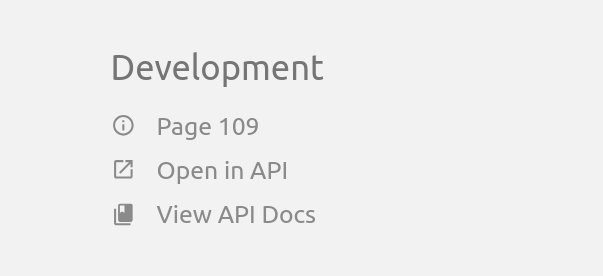
Preview of the Developer Info block, showing a Development heading with a Page 109 item, an Open in API link, and a View API Docs link

Considerations

  • Only English text & labels are included.
  • All users will have access to this block.

Usage

It’s advised to install this as a theme module as guided below. After installation, you’ll then find this block available as a section within the “My Account > Interface Preferences > UI Layout Preferences” area in BookStack, in any content-based layouts.

By default it will show in the “Unused” area, but you can drag it into another column then save the layout. Once configured, it’ll then be visible in the configured location.

Code

functions.php
 1
 2
 3
 4
 5
 6
 7
 8
 9
10
11
12
13
14
15
16
17
18
19
20
21
22
23
24
25
26
27
28
29
30
31
32
33
34
35
36
37
38
39
40
41
42
43
44
45
46
47
48
49
50
51
<?php

use BookStack\Facades\Theme;
use BookStack\Theming\ThemeEvents;
use BookStack\View\BaseViewBlock;
use BookStack\View\ViewBlockManager;

/**
 * Define our custom block to display developer-focused information.
 */
class DeveloperInfoBlock extends BaseViewBlock
{
    // We provide a unique ID for this block to distinguish it from other blocks.
    // This is used as the key when the block is configured as part of a layout.
    public static function getId(): string
    {
        return 'com.bookstackapp.hacks.developer-info-block';
    }

    // We return the label which will show for this block in the configuration UI.
    public static function getLabel(): string
    {
        return 'Developer Info';
    }

    // We return the view name which will be used to render the block.
    public function getView(array $viewData): string
    {
        return 'custom-block-developer-info.block';
    }

    // We return all the developer-focused information based upon the item being viewed.
    public function getViewData(array $viewData): array
    {
        $shownEntity = $viewData['current'] ?? $viewData['shelf'] ?? null;
        return [
            'entity' => $shownEntity,
            'location' => $viewData['location'] ?? null,
        ];
    }
}

// We listen for the VIEW_BLOCKS_REGISTER event using the theme system which, when called,
// provides us a ViewBlockManager instance that we can use to register our custom block.
// We register the block on each item's display/list views, unused by default.
Theme::listen(ThemeEvents::VIEW_BLOCKS_REGISTER, function (ViewBlockManager $manager) {
    $targetLocations = ['shelves-show', 'shelves-index', 'books-show', 'books-index', 'chapters-show', 'pages-show'];
    foreach ($targetLocations as $location) {
        $manager->register($location, 'unused', DeveloperInfoBlock::class);
    }
});
custom-block-developer-info/block.blade.php
 1
 2
 3
 4
 5
 6
 7
 8
 9
10
11
12
13
14
15
16
17
18
19
20
21
22
23
24
25
26
27
28
29
30
31
32
33
34
35
36
37
38
39
40
41
42
43
44
45
46
47
48
49
50
51
52
53
54
55
56
57
58
59
60
61
@php
    $sectionName = match ($location) {
        'pages-show' => 'pages',
        'chapters-show' => 'chapters',
        'books-show','books-index' => 'books',
        'shelves-show','shelves-index' => 'shelves',
        default => '',
    };

    if ($entity) {
        $apiPath = "/api/{$sectionName}/{$entity->id}";
    } else {
        $apiPath = "/api/{$sectionName}";
    }
@endphp
<div id="developer-information" class="entity-details mb-xl">
    <h5>Development</h5>
    <div class="blended-links">
        <div class="entity-meta">

            @if($entity)
                <a href="#" class="entity-meta-item" title="ID" id="developer-information-id" data-id="{{ $entity->id }}">
                    @icon('info')
                    <span>{{ class_basename($entity) }} {{ $entity->id }}</span>
                </a>
                <script nonce="{{ $cspNonce ?? '' }}">
                    const idLink = document.getElementById('developer-information-id');
                    const id = idLink.getAttribute('data-id');

                    idLink.addEventListener( 'click', async (event) => {
                        event.preventDefault();
                        if (window.isSecureContext && navigator.clipboard) {
                            await navigator.clipboard.writeText(id);
                        } else {
                            // Backup option where we can't use the navigator.clipboard API
                            const tempInput = document.createElement('textarea');
                            tempInput.setAttribute('style', 'position: absolute; left: -1000px; top: -1000px;');
                            tempInput.value = id;
                            document.body.appendChild(tempInput);
                            tempInput.select();
                            document.execCommand('copy');
                            document.body.removeChild(tempInput);
                        }
                        window.$events.success('ID copied to clipboard!');
                    });
                </script>
            @endif

            <a href="{{ url($apiPath) }}" target="_blank" class="entity-meta-item">
                @icon('export')
                <span>Open in API</span>
            </a>

            <a href="{{ url("/api/docs#section-{$sectionName}") }}" target="_blank" class="entity-meta-item">
                @icon('books')
                <span>View API Docs</span>
            </a>

        </div>
    </div>
</div>

Install as Module (Beta)

If using BookStack v26.03 or later, you can install this hack as a theme module on your BookStack instance by running the below artisan command from your BookStack installation folder:

php artisan bookstack:install-module https://www.bookstackapp.com/hack-modules/block-developer-info.zip


Request an Update

Hack not working on the latest version of BookStack?
You can request this hack to be updated & tested for a small one-time fee.
This helps keeps these hacks updated & maintained in a sustainable manner.


Latest Hacks